


Lawn Buddy Management Software
4.0100.00 Reviews
App Specs
- Version
- 6.0.323
- Updated On
- License
- Free
- Downloads
- 10,000+
- Developer
- Lawn Buddy, LLC
- Categories
- Business
- Platform
- Android
Screenshots
 Analysis by AppCompare
During the first week with a new business app, the promise is easy to see: fewer loose notes, a clearer view of jobs, and less time spent chasing details. Lawn Buddy Management Software is aimed at lawn care businesses that want one place to organize their work. I like that its appeal is practical rather than flashy: it is meant to support the routine tasks that keep a service business moving.
That routine is also the real test. A calendar is only useful if it stays current, and customer records only help when someone adds useful notes after a visit. I would judge Lawn Buddy less by the first satisfying setup session and more by whether it fits the habits of the person who handles scheduling, field work, and billing. For a small operator who wants a dedicated lawn-care workflow, it is worth considering; for someone who only needs a basic calendar, it may be more than necessary.
How Lawn Buddy Holds Up Beyond the First Week
I look beyond the first burst of tidiness and ask whether Lawn Buddy can become part of the ordinary rhythm of a lawn-care business. The useful test is whether schedule updates, customer notes, and billing still get maintained when the week gets busy—not whether setup feels satisfying. That makes routine ownership the key question as I consider how its value holds up from month to month.
First Impressions
When I first opened Lawn Buddy Management Software, I was immediately struck by its clean and intuitive interface. It’s got that modern feel, which makes navigating through the different features a breeze. Whether you’re a tech newbie or a seasoned pro, getting the hang of this app is a piece of cake.
The early benefit is having business details gathered in a work-focused place instead of scattered across a personal calendar, paper job sheets, and message threads. That does not remove the need for a consistent routine, but it gives the owner or office coordinator a more natural home base for the day’s work. Lawn Buddy is a free business app from Lawn Buddy, LLC, and its Everyone age rating makes it broadly accessible. The app has a 3.9 average from around 160 ratings, so I would treat the initial ease of use as a promising start, not proof that every team will find it effortless.
Features Galore
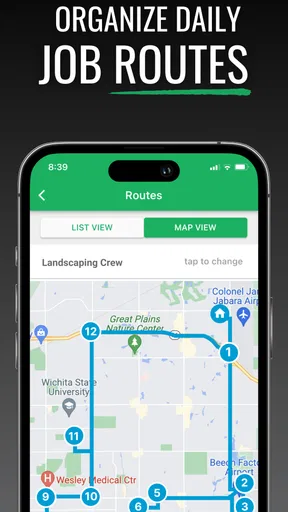
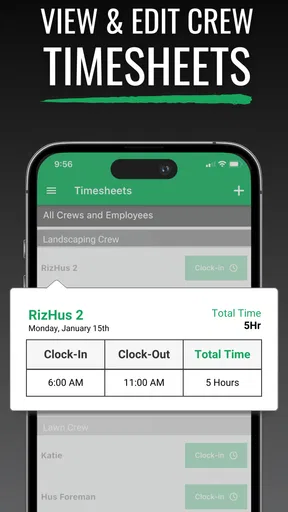
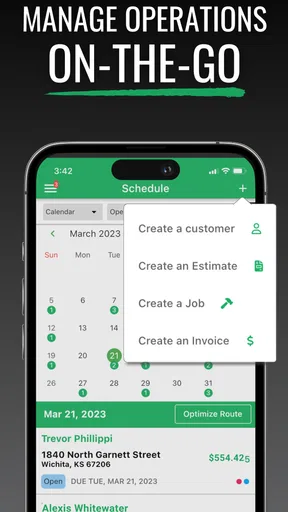
Let’s dive into what Lawn Buddy offers. One of the standout features is its scheduling system. You can easily view your calendar, add new jobs, and even assign tasks to your crew. It’s all about making sure you know who’s doing what and when. No more scribbling on whiteboards or sending endless text messages.
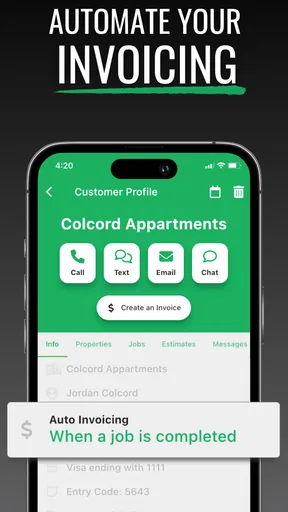
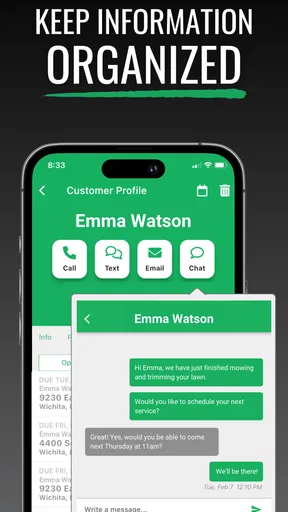
Another feature that caught my eye is the customer management tool. You can store client information, track their preferences, and even keep notes on past jobs. It’s like having a personal assistant who remembers everything for you!
Worth Reading Before You Choose

Flipboard Shows What News Apps Must Do Beyond the Feed

Switching to Android Auto Means Rethinking Your Driving Routine

Google Calendar Makes a Crowded Week Easier to Manage

Ludo King Makes the Most of the Minutes Between Plans

Baby Panda World Brings Quick Play to Modern Phones, but Its Game Library Feels Busy

ESPN’s Live Game View Makes Following Close Games Easier
Invoicing is another area where Lawn Buddy shines. You can generate invoices directly from the app, and it syncs seamlessly with your bookkeeping software. Plus, there’s even an option for clients to pay online, which is super convenient.
These tools are most valuable when they are connected by a repeatable habit. For example, when a customer calls to change a visit, update the job record while you are speaking with them, then check the schedule before promising a new time. After the crew finishes, a short note about a gate, a preferred service detail, or a change requested on site can make the next visit smoother. This is a modest workflow, but it prevents useful information from living only in someone’s memory.
For a typical morning, an owner could review scheduled work, confirm which crew is responsible, and use customer notes to catch a detail before the team heads out. Later, the completed work can feed into the invoicing routine rather than requiring a separate round of reconstructing what happened. The practical gain is not that the app makes decisions for you; it is that it can reduce the handoffs between planning, remembering, and billing when everyone follows the same process.
Ease of Use
Using Lawn Buddy is as straightforward as mowing a flat lawn. The app flows nicely, with everything in its right place, making it easy to jump from one task to another. The learning curve is practically non-existent, which means you can spend more time focusing on your business rather than figuring out how the app works.
Still, a smooth interface cannot decide how your business handles exceptions. Weather changes, a customer postponing service, or a crew running behind can all disrupt a tidy schedule. I would make one person responsible for keeping the calendar current and agree on a simple rule for recording changes. Otherwise, the app risks becoming one more place to check rather than the dependable schedule everyone relies on.
There is also a useful distinction between storing customer information and maintaining good customer records. A note such as “call before arriving” is actionable; a long, unstructured entry is harder to use when the crew is in a hurry. Keeping notes brief and focused helps the customer-management side stay useful over many repeat visits, rather than turning into a digital drawer full of details no one can find quickly.
What About Support?
If you ever hit a snag, Lawn Buddy’s support team is just a click away. I tried reaching out with a couple of questions and got prompt, helpful responses. It’s reassuring to know that you’re not on your own if you run into any issues.
That reassurance matters most during setup and the first few billing cycles, when a business is deciding whether to move its working records into a new system. I would still start with a small, controlled transition: add current customers and upcoming work first, then establish a routine for new notes and invoices. Avoid trying to recreate every historical record on day one. A gradual change makes it easier to see whether the app suits your actual work without creating a large administrative project before the team has adopted it.
Who Is It For?
If you’re a solo landscaper or run a small team, Lawn Buddy is definitely worth a look. It’s designed for those who want to keep things organized without drowning in paperwork or complex software.
Even if you’re running a larger operation, the app is scalable. You can add more users and manage multiple crews, making it versatile enough to grow alongside your business.
The best fit is a lawn-care operator who handles recurring jobs and needs scheduling, client details, and billing to support the same service workflow. A solo worker can use it as a central record rather than splitting the day between a calendar and handwritten reminders. A small crew can benefit when the person arranging jobs records changes in one place and the people doing the work know where to check the assignment.
On the other hand, if you manage only a handful of occasional jobs, a general calendar and a simple invoicing tool may be easier to maintain. A business with unusual operational needs should also check that its routine fits the app before committing its whole process to it. The key question is not whether more software is automatically better; it is whether the scheduling and customer records solve a recurring problem often enough to justify another system that needs attention.
Compared with spreadsheets, paper planners, and group messages, a dedicated lawn-care app has the advantage of organizing jobs around customers and crews rather than leaving the owner to reconcile several separate sources. The trade-off is the discipline of keeping that system accurate. A spreadsheet may be more flexible for a person who likes building a custom workflow, while a basic calendar may be quicker for a very small operation. Lawn Buddy makes more sense when the lawn-service context and linked business tasks are worth having together.
Month-to-Month Value and Maintenance
The lasting value comes from repetition, not from adding every customer detail imaginable. At the end of each workday, spend a short, predictable period checking that completed jobs are recorded, changes are reflected in the calendar, and billing has not been left until the week becomes busy. That small closeout habit can make the next morning less dependent on memory. If nobody owns that step, even a useful app can slowly lose credibility as its records drift away from what is happening in the field.
There is a trade-off in moving information into any business app: entering and maintaining records takes time, especially at the start. I would prioritize active customers, upcoming appointments, and notes that affect service. Old or low-value information can wait. This keeps setup manageable and gives the team a fair test of the core workflow before deciding whether it is worth expanding its use.
The app is free to download, while in-app purchases range from around twelve dollars to three hundred and sixty dollars per item. I would check the purchase details in the app against the needs of the business before relying on a paid option. The important practical question is what the team will use regularly, not whether a larger package sounds more complete. Its current version is 6.0.302, and it runs on iOS 7.1 or later, which makes device compatibility worth checking before installation on an older phone or tablet.
Where Routine Can Turn Into Fatigue
The main risk is duplicate work. If a crew continues to send schedule changes in messages but the owner also expects the app calendar to be accurate, both channels must be monitored and reconciled. Decide which record is authoritative and tell everyone how to report a change. That is a small management decision, but it can determine whether a digital schedule reduces confusion or simply adds another inbox.
Another source of fatigue is expecting automation to replace judgment. Lawn care has exceptions: a customer may ask for a different time, a job may take longer than expected, or a note may no longer reflect the property. The app can help organize the information, but a person still needs to review it. If a business has complex routing, detailed reporting requirements, or tightly specialized accounting practices, it should compare Lawn Buddy with tools built around those needs before switching its whole operation.
The recurring cost question deserves the same practical approach. Since the app itself is free and some purchases are available inside it, I would identify which functions are essential before paying for anything. If the free experience already handles the team’s daily schedule and records, there is no reason to buy more simply because it is offered. If a paid option is necessary, judge it against time saved and tasks it genuinely supports rather than assuming every business needs the same setup.
Final Thoughts
In a nutshell, Lawn Buddy Management Software is like having a digital foreman in your pocket. It’s efficient, user-friendly, and packed with features that can genuinely make a difference in how you run your landscaping business.
So, if you’re tired of juggling spreadsheets, sticky notes, and endless phone calls, give Lawn Buddy a try. It might just be the game-changer you’ve been looking for.
My long-term recommendation is measured: Lawn Buddy earns a lasting place when the business uses its schedule, customer notes, and invoicing as part of one everyday routine. It is less compelling if the team will keep its real records elsewhere or if the operation needs a highly specialized system. The app has been available since March 9, 2017, and has passed ten thousand installs, but age and reach are not substitutes for checking how it fits your own work. I would begin with a few active customers and a normal week of jobs, then keep using it only if the records stay current and make the next workday easier.
Pros
- User-friendly interface for easy navigation.
- Comprehensive scheduling feature.
- Real-time updates on job status.
- Efficient invoicing system.
- Excellent customer support.
Cons
- Limited integration with third-party apps.
- Occasional syncing issues.
- Requires stable internet connection.
- Limited customization options.
- No free version available.
FAQs for Lawn Buddy Management Software
What features does Lawn Buddy Management Software offer for lawn care businesses?
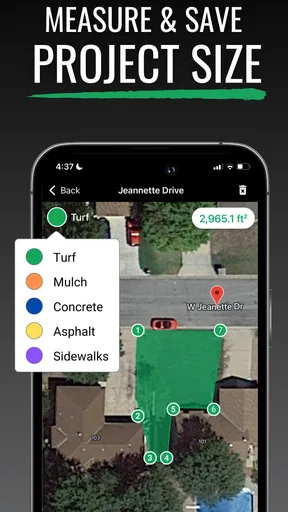
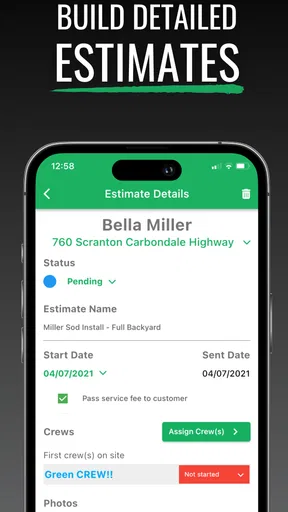
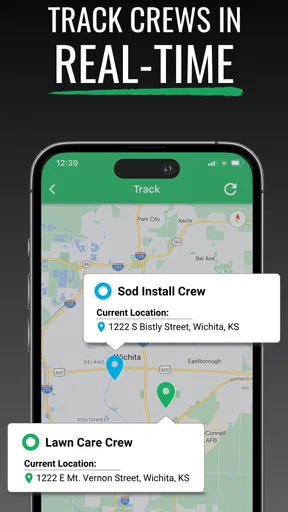
Lawn Buddy Management Software provides a comprehensive suite of features tailored for lawn care businesses. It includes scheduling, invoicing, GPS tracking, customer management, and more. The app aims to streamline operations, improve communication with clients, and manage crews efficiently. Its user-friendly interface ensures that both small and large businesses can navigate and utilize these features effectively.
Is Lawn Buddy Management Software available on both Android and iOS devices?
Yes, Lawn Buddy Management Software is available on both Android and iOS platforms. This cross-platform availability ensures that users can access their business operations on the go, regardless of their preferred device. The app is designed to provide a seamless experience across both operating systems, allowing for a consistent and reliable performance.
How does Lawn Buddy Management Software help with customer management?
Lawn Buddy Management Software offers robust customer management tools that allow businesses to keep detailed records of their clients. Users can track customer history, preferences, and service schedules. Additionally, the software facilitates easy communication with clients through automated notifications and reminders, improving customer satisfaction and engagement.
Can Lawn Buddy Management Software handle invoicing and payments?
Yes, Lawn Buddy Management Software includes features for invoicing and payment processing. Users can generate professional invoices directly from the app and send them to clients. The software also supports various payment methods, enabling clients to pay online easily. This functionality helps businesses maintain a steady cash flow and reduces the administrative burden.
What level of customer support does Lawn Buddy Management Software provide?
Lawn Buddy Management Software offers comprehensive customer support to assist users with any issues or questions. Support options typically include email, phone support, and a detailed FAQ section on their website. The support team is dedicated to ensuring that users have a smooth experience while using the app, helping them resolve any technical or operational challenges quickly.


